

TL;DR When a site feels invisible to AI, it often isn’t about content quality. Instead, back-end permissions may be blocking AI bots from accessing the content in the first place. Learn more about how robots.txt creates a “front door” for AI crawlers, how things like CDN overrides and plugin defaults can get in the way, and how a 30-minute fix can get you back on track.
One of the unseen realities of the modern online experience (especially content creation and strategy) is the presence of AI crawlers. These are automated bots that visit sites to check permissions and retrieve information for AI tools to use.
These are a key part of companies showing up in AI-generated search results. The growing importance of AI bots is leading many marketers to wonder if they are benefiting from AI visibility or if their site is blocking AI crawlers.
The truth is, AI crawler activity is invisible to most marketing teams. It feels impossible to know if they’re accessing your content without checking with a developer. If you’re a marketer, you don’t need deep technical knowledge to understand the basics or spot the most common issues. Let’s look at how AI crawlers work, what “permission” means in this context, some of the more common ways they’re blocked, and what you can do to give (the right) AI access to your content.
Why is your site invisible to AI, even with strong content?
If you’re not showing up in AI answers, your content may not be the problem. In many cases, site settings quietly block AI bots before they ever have the chance to access your content, often without you even realizing it.
I remember when we worked with a client who was struggling to capture AI traffic. We reviewed their content and quickly realized the problem wasn’t the content itself.
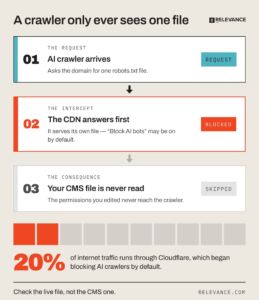
What we found causing the issue was that there were two robots.txt files fighting each other. It sounds unusual, but it can happen without anyone knowing it. One was in HubSpot, the other in Cloudflare. The former is the content management system (CMS) you see when you upload content. The latter is a content delivery network (CDN), which sits in front of your website and can control what visitors and crawlers receive.
That meant Cloudflare was the frontline of defense for the site. It also meant it was turning away AI crawlers, even though the user-side HubSpot robots.txt file was set to allow them on the site.
What made this so difficult to spot was that AI crawlers only ever follow one robots.txt file. In this case, the version being served came from Cloudflare rather than HubSpot, so the permissions inside the CMS never came into play. When a site sits behind a CDN or security layer like Cloudflare, that layer can serve a different version instead. In other words, the file you see inside your CMS isn’t always the file AI crawlers receive.
We dug further and found that Cloudflare had announced that it was blocking AI crawler access to sites by default. It took a simple adjustment on that side of things, and AI bots were able to access the content. Problem solved.
The bigger issue is that this wasn’t an isolated case. Cloudflare services traffic for 20% of the Internet. Trillions of requests come through its systems every day. The fact that a fifth of the internet operates on a setting that, by default, blocks AI bots is something that is quietly holding back many businesses without them ever realizing it. This blocks AI visibility.
This is a big deal in a world where the simple presence of an AI summary on a Google search query drops the likelihood of a click to a meager 8%. Businesses need to optimize for AI citations, and the reality is that many of them are held back by unseen robots.txt files that compete with their officially sanctioned versions on their CMS. Add in the fact that older sites often have AI blocked from habits early in the AI era, and there is a significant quantity of high-quality content that AI simply cannot access, even if its owners desperately want them to.
Check your AI crawler access
You don’t need a developer to see what your robots.txt file is telling AI crawlers. Enter your domain below to check the live version of the file and see which major AI bots are allowed, blocked, or only partially allowed.
If something looks off, don’t panic. A blocked result is not automatically bad. Whether it is a problem depends on which bot it is. Not every AI bot does the same job: some help your content appear in AI answers, others fetch a page the moment someone asks about you, and others are used to train future models. Before you change any permissions, it helps to know the difference.
What’s the difference between search bots, fetchers, and training bots?
Before we get into the different kinds of AI bots, it helps to understand how these permissions actually work. That all starts with your robots.txt file. Think of it as the front door to your website. It tells crawlers what they’re welcome to access and what should stay off limits.
You don’t need to understand every line in the file to understand the parts that matter. A User-agent tells you which crawler a rule applies to. Allow gives that crawler permission to access part of your site. Disallow tells it to stay out. The mechanics are simple. But if the wrong bots end up being turned away, your content may never have the chance to appear in AI answers.
With those basics covered, it’s also important to remember that not all AI bots are doing the same job. They generally fall into three buckets:
- Search and retrieval: These are the bots that help decide if your content can show up in AI answers and citations in the first place. Examples of this kind of bot include OAI-SearchBot (OpenAI’s bot), Claude-SearchBot (Anthropic’s version), and PerplexityBot.
- User-triggered fetchers: These are “in the moment” AI bots that access content in relation to a specific query.
- Training bots: These are AI bots that help train future models and include GPTBot (OpenAI’s again), ClaudeBot (Anthropic’s training tool), Google-Extended, and CCBot (Common Crawl, less well-known but feeds many models with data).
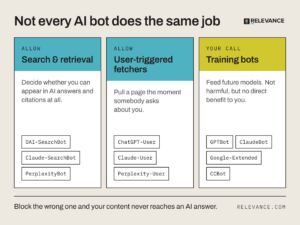
These each serve a purpose, and if you’re creating content, you absolutely want the first two to access your site. Training bots are another question. They aren’t inherently good or bad, but they just don’t benefit you in the same way. It’s worth an internal conversation to see where you stand on permissions related to them.
The biggest thing to remember is that your live robots.txt file should explicitly allow the search, retrieval, and user-triggered AI bots you want accessing your site. Once you’ve done that, the rest of this process is really about making sure those permissions are the ones AI crawlers actually receive when they arrive.
Putting those permissions into practice starts with your robots.txt file. Robots.txt files work on the honor system, but companies like OpenAI, Anthropic, and Google claim they respect this “front door” permission tool. When an AI bot gets to your site, it only sees one robots.txt file. That’s why uploading permissions into your CMS isn’t enough. You want to make sure the live robots.txt file being served is the one you intended.
In practice, that usually means making sure the right user agents are allowed.
A starting point for common AI user agents
The example below is a good starting point for the AI user agents you’ll likely want to review in your robots.txt file.
# OpenAI
User-agent: GPTBot
Allow: /
User-agent: OAI-SearchBot
Allow: /
User-agent: ChatGPT-User
Allow: /
# Anthropic
User-agent: ClaudeBot
Allow: /
User-agent: Claude-User
Allow: /
User-agent: Claude-SearchBot
Allow: /
# Perplexity
User-agent: PerplexityBot
Allow: /
User-agent: Perplexity-User
Allow: /
# Google AI (does NOT affect normal Google Search ranking)
User-agent: Google-Extended
Allow: /
Note: Treat this as a starting point. AI companies occasionally introduce new user agents or retire older ones, so it’s worth checking their latest documentation when updating your robots.txt file.
Getting AI crawler permissions right is an important part of a broader generative engine optimization (GEO) strategy. It won’t guarantee AI visibility on its own, but it helps ensure your content can actually be discovered and considered for AI-generated answers.
Where does an AI-crawler block actually hide?
If you suspect you’re dealing with permission issues with robots.txt AI bots, there are a few places you want to see where the problem could be hiding:
- Your robots.txt itself could be holding you back by not giving a bot the permission it needs.
- A CDN override could be to blame. For instance, Cloudflare has a one-click “Block AI Bots” option.
- The AI bot Cloudflare default-on toggle is another common source of permission issues.
- Some SEO plugins for WordPress, Shopify, and similar platforms introduced AI bot settings during 2024–2025. Older sites may still have those defaults enabled, so they’re worth checking.
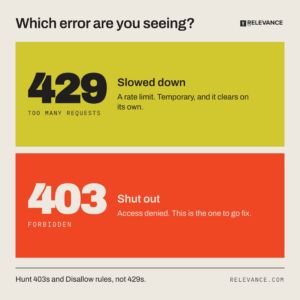
- Rate limits can also slow down AI bot access. Fortunately, a 429 (“Too Many Requests”) isn’t the same as a 403 (“Go away”) and marks a temporary slowdown.
Just to be clear here, too, there are some crawlers that do genuinely ignore robots.txt voluntary protocols. Crawlers from tools like Bytespider and Perplexity, for instance, have a reputation for documenting with undeclared crawlers. It may be worth blocking those specific AI bots, but that should be a separate and distinct event, not a general toggled-off AI bot rule.
Is llms.txt worth adding?
If you’ve heard of llms.txt, these are files that curate and markdown an index of the most important pages on your site. This can help AI tools understand your content better, and it may be worth adding, but it isn’t necessary.
Start by clearing the way for AI bots to access your content directly. Then add llms.txt as a secondary enhancement. It works best after you’ve already made your content accessible.
How do I check this in 30 minutes?
If you’re wondering whether AI bots can access your content (or even if you want to go the other direction and block AI crawlers), there are a few steps you can take as part of an internal generative engine optimization audit before you hunt down a qualified GEO company to go deeper.
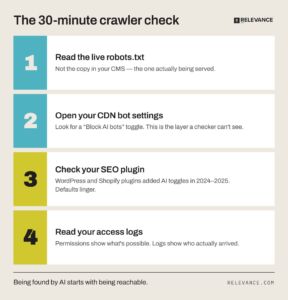
Start with the checker above. It already shows you the live robots.txt and flags each major AI bot as allowed, blocked, or partial, so you don’t need to open the file yourself or guess at what a rule means. Once you know where you stand, work through the rest:
-
- If you use Cloudflare or any CDN, log in and check the bot or AI-crawler settings. Is “block AI bots” on here, too? This is the layer the checker can’t see, and it’s often the real source of a block even when your CMS looks fine.
- If you are on WordPress or Shopify, check your SEO plugin for an “AI bots” toggle. Older sites or plugins installed or updated during 2024–2025 may still have AI-blocking defaults enabled, so it’s worth checking even if you haven’t changed those settings recently.
- Permissions show what’s possible, but logs are the real answer to see if any bots are actually crawling your site. Ask whoever manages your server or hosting for a quick look at your access logs. Filter these for specific bots, including GPTBot, ClaudeBot, PerplexityBot. Are they showing up at all?
- If you see 429s, remember not to panic. That is a throttling problem, not a blocking one. Look for 403s and Disallow rules instead. Those are the ones that cause permanent issues.
Being found by AI starts with being reachable
AI visibility has become more than a content plan. It’s an infrastructure decision and often, default settings and back-end layers make many of the decisions without marketing teams ever being aware of it.
Making your content reachable is one of the foundational steps in a good AI SEO strategy. Set your robots.txt files up correctly to ensure your best content gets in front of the right people.
FAQ
What is GPTBot and should I block it?
GPTBot is OpenAI’s AI crawler. It specifically focuses on training future models, which means blocking it can be a policy that doesn’t harm your GEO or other AI bot permissions.
Does Google-Extended affect my regular Google ranking?
No. Google-Extended doesn’t touch classic Google ranking data from Googlebot. Blocking it does not affect classic Google Search.
What’s the difference between a 429 and a 403 for AI crawlers?
A 429 is a rate limit issue, which means it should clear up later. A 403 means access was denied and is more likely to point to a blocked AI bot.
